Big Lessons from Small Models
Teaching Python AI with SLMs
 Scan for slides
Hi, I'm Gwyneth.
madebygps.azurewebsites.net
- Python Developer Advocate at Microsoft
- In my free time, maintainer of learntocloud.guide, a free, open-source platform for learning cloud engineering
- Accessible education is a big part of what I care about
Where this talk came from
- A year of teaching series with my colleague Pamela Fox on RAG, MCP, agents, and more
- Our priority was:
how do we make this content accessible to as many learners as possible? - When the curriculum is AI, accessibility includes the models themselves
- Run the code, experiment, learn, without a paywall or a powerful machine
SLMs are the answer.
What is an SLM?
For this talk, an SLM is a small language model: small enough to run locally, no custom hardware.
Families worth knowing right now: Qwen, Gemma, Phi, Llama, Mistral
Lesson 1
Make it dead simple.
Setups should make using and swapping models seamless.
Step 1
Ollama
- Open source, OpenAI-compatible endpoint out of the box
- Big, growing catalogue. Pull a new model with one command
ollama pull gemma4:e4b→ serves onlocalhost:11434
no accounts no billing no keys
Step 2
The .env-sample
API_HOST=ollama
OLLAMA_MODEL=gemma4:e4b
OLLAMA_ENDPOINT=http://localhost:11434/v1
OLLAMA_API_KEY=no-key-needed
Every repo ships one with the model and endpoint baked in. Learners cp it, rename it, configured.
Ollama exposes an OpenAI-compatible endpoint, so the local SLM looks just like a hosted model.
Step 3
A sample for every framework
Provide samples across frameworks so learners have ample working code to ground themselves with.
python-ai-agent-frameworks-demos
examples/
├── agentframework_basic.py
├── agentframework_tools.py
├── langchainv1_basic.py
├── langchainv1_tools.py
├── langgraph_agent.py
├── llamaindex.py
├── openai_agents_basic.py
├── pydanticai_basic.py
└── … (~25 more)
python-mcp-demos
agents/
├── agentframework_http.py
├── agentframework_learn.py
└── langchainv1_github.py

servers/
├── basic_mcp_http.py
├── basic_mcp_stdio.py
└── auth_entra_mcp.py
Two of seven repos. Full list and 150+ samples in the README at github.com/madebygps/pycon26.
Same shape across every framework
agent-framework
load_dotenv(override=True)

client = OpenAIChatClient(
    base_url=os.environ.get(
        "OLLAMA_ENDPOINT",
        "http://localhost:11434/v1"),
    api_key="none",
    model=os.environ.get(
        "OLLAMA_MODEL", "gemma4:e4b"),
)
LangChain
load_dotenv(override=True)

model = ChatOpenAI(
    model=os.environ.get(
        "OLLAMA_MODEL", "gemma4:e4b"),
    base_url=os.environ.get(
        "OLLAMA_ENDPOINT",
        "http://localhost:11434/v1"),
    api_key="none",
)
Pydantic AI
load_dotenv(override=True)

client = AsyncOpenAI(
    base_url=os.environ.get(
        "OLLAMA_ENDPOINT",
        "http://localhost:11434/v1"),
    api_key="none",
)
model = OpenAIChatModel(
    os.environ["OLLAMA_MODEL"],
    provider=OpenAIProvider(openai_client=client),
)
LlamaIndex
load_dotenv(override=True)

Settings.llm = OpenAILike(
    model=os.environ.get(
        "OLLAMA_MODEL", "gemma4:e4b"),
    api_base=os.environ.get(
        "OLLAMA_ENDPOINT",
        "http://localhost:11434/v1"),
    api_key="none",
    is_chat_model=True,
)
Same env, same shape. Different framework.
And the agent call too
agent-framework
agent = ChatAgent(
    chat_client=client,
    instructions=system_prompt,
    tools=[get_current_date, get_weather,
           get_activities],
)

result = await agent.run(
    "hii what can I do this "
    "weekend in San Francisco?"
)
LangChain
agent = create_agent(
    model=model,
    system_prompt=system_prompt,
    tools=[get_current_date, get_weather,
           get_activities],
)

result = agent.invoke({"messages": [
    {"role": "user", "content":
     "hii what can I do this "
     "weekend in San Francisco?"}
]})
Pydantic AI
agent = Agent(
    model,
    system_prompt=system_prompt,
    tools=[get_current_date, get_weather,
           get_activities],
)

result = await agent.run(
    "hii what can I do this "
    "weekend in San Francisco?"
)
LlamaIndex
agent = ReActAgent(
    name="planner",
    llm=Settings.llm,
    tools=[get_current_date, get_weather,
           get_activities],
    system_prompt=system_prompt,
)

result = await agent.run(
    "hii what can I do this "
    "weekend in San Francisco?"
)
A pattern learners recognize from one sample to the next.
Same with MCP calls
agent-framework
async with (
    MCPStreamableHTTPTool(
        name="Microsoft Learn MCP",
        url="https://learn.microsoft.com/api/mcp",
    ) as mcp_server,
    Agent(client=client, tools=[mcp_server]) as agent,
):
    result = await agent.run(query)
LangChain
mcp_client = MultiServerMCPClient({
    "github": {
        "url": "https://api.githubcopilot.com/mcp/",
        "transport": "streamable_http",
        "headers": {"Authorization": f"Bearer {token}"},
    }
})
tools = await mcp_client.get_tools()
Pydantic AI
server = MCPServerStreamableHTTP(
    url="http://localhost:8000/mcp",
)

agent = Agent(
    model,
    system_prompt=system_prompt,
    toolsets=[server],
)
result = await agent.run(query)
OpenAI Agents
mcp_server = MCPServerStreamableHttp(
    name="weather",
    params={"url": "http://localhost:8000/mcp/"},
)
await mcp_server.connect()

agent = Agent(
    name="Assistant",
    instructions=system_prompt,
    mcp_servers=[mcp_server],
    model=OpenAIResponsesModel(
        model=MODEL_NAME, openai_client=client),
)
result = await Runner.run(agent, query)
Short setup loop.
For learners to actually try SLMs across all these frameworks, the path has to be seamless.
Local
git clone <repo>
install ollama
ollama pull gemma4:e4b
cp .env-sample .env
uv sync
uv run examples/weekend_planner.py
devcontainer ollama feature
// .devcontainer/ollama/devcontainer.json
"features": {
  "ghcr.io/prulloac/devcontainer-features/ollama:1": {
    "pull": "gemma4:e4b"
  }
},
"postCreateCommand":
  "uv sync && cp .env.sample.ollama .env"
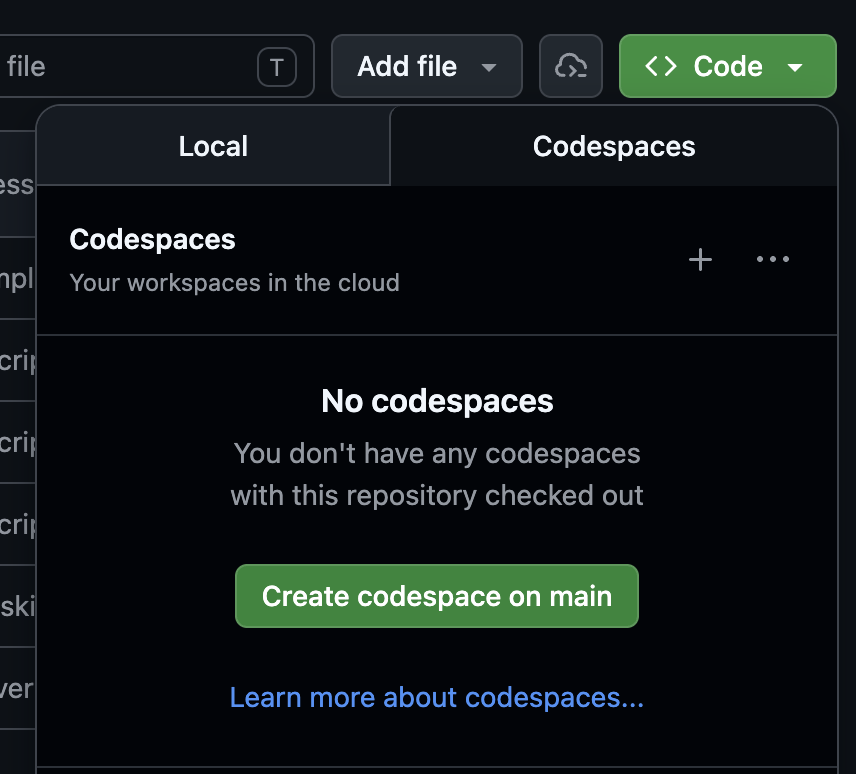
Or just open a Codespace
Outgrow local? Graduate up.
From the code's point of view, the local SLM looked just like a hosted model. Switch the env, keep the code.
API_HOST=azure
AZURE_OPENAI_ENDPOINT=https://my-resource.openai.azure.com
AZURE_OPENAI_CHAT_DEPLOYMENT=gpt-4o
Use any OpenAI-compatible hosted model.
Lesson 2
Know what works today.
New models drop constantly. Re-evaluate constantly.
A snapshot today
Two open models worth using today.
| qwen3.5:9b | gemma4:e4b | |
|---|---|---|
| Disk / RAM (Q4) | 6.6 GB | 9.6 GB on disk, ~5 GB at runtime |
| Total params | 9.65B | 8B (4.5B effective) |
| Modalities in | text, image | text, image, audio |
| Context window | 256K | 128K |
| Capabilities | tools, thinking, vision | tools, thinking, vision, audio |
Zoomed out, on the family:
"The Qwen models are pretty good at things like function calling." Ross Taylor, Interconnects
"Gemma 4: byte for byte, the most capable open models." Simon Willison
Some pros/cons from our context
qwen3.5:9b
- + Reliable single tool calls
- + Handles parallel and multi-step tool loops
- + Returns valid nested JSON for structured output
- + Clean on focused MCP servers
- − Stumbles in multi-agent orchestration
- − Narrows incorrectly on long MCP responses
gemma4:e4b
- + Fast on basic tool calls
- + Clean on focused MCP servers
- − Returns prose instead of JSON for nested structured output
- − Loops the same tool in multi-step orchestration
- − Drifts off task on long MCP responses
Full results, file mappings, and run notes: github.com/madebygps/pycon26/field-reports.md
Categorize before you teach.
Categorize your samples into one of three:
works
Learners can simply run it. The SLM is capable of executing the task end to end.
doesn't
You experimented with the sample, tried things your experience told you to try. The SLM just can't do this one yet.
needs help
Could work with the SLM, but needs context engineering, prompt engineering, a small pipeline tweak. Something a learner can grow into.
The needs-help bucket is where the teaching lives. Two examples next.
Example 1
Prompt engineering
from tool-call mistakes.
They ran it. It hallucinated.
uv run examples/langchainv1_tools.pyget_current_date get_weather get_activities
Prompt rule: "if an activity would be unpleasant in the weather, don't suggest it."
Query: "hii what can I do this weekend in San Francisco?"
This weekend in San Francisco (January 17-18, 2026) is expected to be rainy
with temperatures around 60°F. Given the weather conditions, here are
some recommendations:

Saturday, January 17, 2026 (Rainy, 60°F):
- Museum visits: Indoor museums like the San Francisco Museum of Modern
  Art or the de Young Museum would be perfect for staying dry while
  exploring exhibits
- Beach visits: While technically outdoor, the beaches are still enjoyable
  in mild rain conditions
- Hiking: Light rain may be acceptable for some outdoor activities

[Sunday, January 18 looks similar…]
hallucinated ignored instruction
So they tightened the prompt.
system_prompt=(
    "You help users plan weekends using only information returned by the tools. "
    "Always call get_current_date first. Interpret 'this weekend' relative to that date. "
    "If today is Saturday or Sunday, include today as part of this weekend. "
    "Use only exact dates returned or derived from the current date, and make sure weekdays match dates. "
    "Call get_weather and get_activities only for the weekend dates you plan to discuss. "
    "Do not invent specific venues, restaurants, museums, neighborhoods, or activities unless a tool returned them. "
    "If an activity would be unpleasant in the weather, explain briefly and do not recommend it. "
    "Return a concise plain-text recommendation."
)
This Weekend in San Francisco (January 17-18, 2026)
Saturday January 17: Rainy, 60°F. Visit the Museum.
Sunday January 18: Rainy, 60°F. Visit the Museum.
Both days feature Museum activities, which is ideal given the rainy
conditions. Hiking and Beach activities are not recommended due to the rain.grounded follows instruction
Example 2
Context limits from
MCP responses.
They ran it.
uv run agents/agentframework_learn.pyAn agent connected to the Microsoft Learn MCP server:
MCPStreamableHTTPTool(
    name="Microsoft Learn MCP",
    url="https://learn.microsoft.com/api/mcp",
)
System prompt:
You help with Microsoft documentation questions.Query: "What are the available hosting options for a Python web app on Azure? Compare them briefly."
The answer went sideways.
This is a crucial distinction to understand when working with official
Microsoft documentation tools.

Here is a detailed comparison of `microsoft_docs_search` and
`microsoft_docs_fetch`:

`microsoft_docs_search` is your primary tool for discovery...
`microsoft_docs_fetch` is used for depth...

Summary Workflow:
1. Start with `microsoft_docs_search`
2. Identify the Best URL
3. Follow up with `microsoft_docs_fetch`
...
The model dropped the question and described the MCP tools instead.
The trace showed huge MCP responses, too much for a small context window to focus.
off task
So they reshaped the input.
New system prompt:
You are a helpful assistant that answers questions using Microsoft documentation.
Use only the supplied evidence packet.
Keep your answer focused on what the user asked. Do not add unrelated topics.
Be concise and cite sources when possible.
Student implementation:
Question + evidence packet to the agent.
Azure offers several hosting options, with the best choice depending on
your required level of control, complexity, and scaling needs. The main
options are Azure Container Apps, Azure Kubernetes Service, Azure App
Service, and Azure Functions.

| Service                  | Best For                                | Complexity   | Control |
|--------------------------|-----------------------------------------|--------------|---------|
| Azure Container Apps     | Microservices, Web APIs, containers     | Low–Medium   | High    |
| Azure Kubernetes Service | Large-scale enterprise apps             | High         | Highest |
| Azure App Service        | Traditional web apps                    | Low          | Medium  |
| Azure Functions          | Event-driven tasks                      | Lowest       | Low     |
grounded on task
The loop the students practiced
- Observed the failure
- Inspected the trace
- Named the constraint
- Adjusted the design (prompt, pipeline, whatever fit)
- Ran it again
All because of the constraints.
The limits transfer up.
- Tighter prompts
- Reading tool traces
- Designing grounded systems
The same skills production AI work demands.
SLMs make you practice them. Bigger models let you skip them.
The conclusion
- SLMs make AI learning accessible.
- Simple setup lets learners focus on the system, not the plumbing.
- Model failures create the moments where real engineering habits form.
Big lessons and learning live in small models.
Thank you.
Scan for slides